Themes
Color themes and help renderer customization.
Themes and Rendering
treeparse supports multiple built-in color themes for the rendered help tree.
from treeparse.utils.color_config import color_theme
from treeparse import cli

app = cli(..., theme=color_theme.GITHUB)
Available themes (defined in color_config.py):
defaultmonochromemononeonred_white_bluegithubmonokaitokyo_night
The help rendering is handled by treeparse.utils.help_renderer.
You can pass either the enum member or the string value (theme="github" also works).
For custom colors or symbols, subclass or provide your own color_config.
Color Theme Demos
The examples/all_themes_demo.py renders the same CLI structure under every built-in theme (captured via shellplot for accurate colors and layout):
uv run --with-editable . python examples/all_themes_demo.py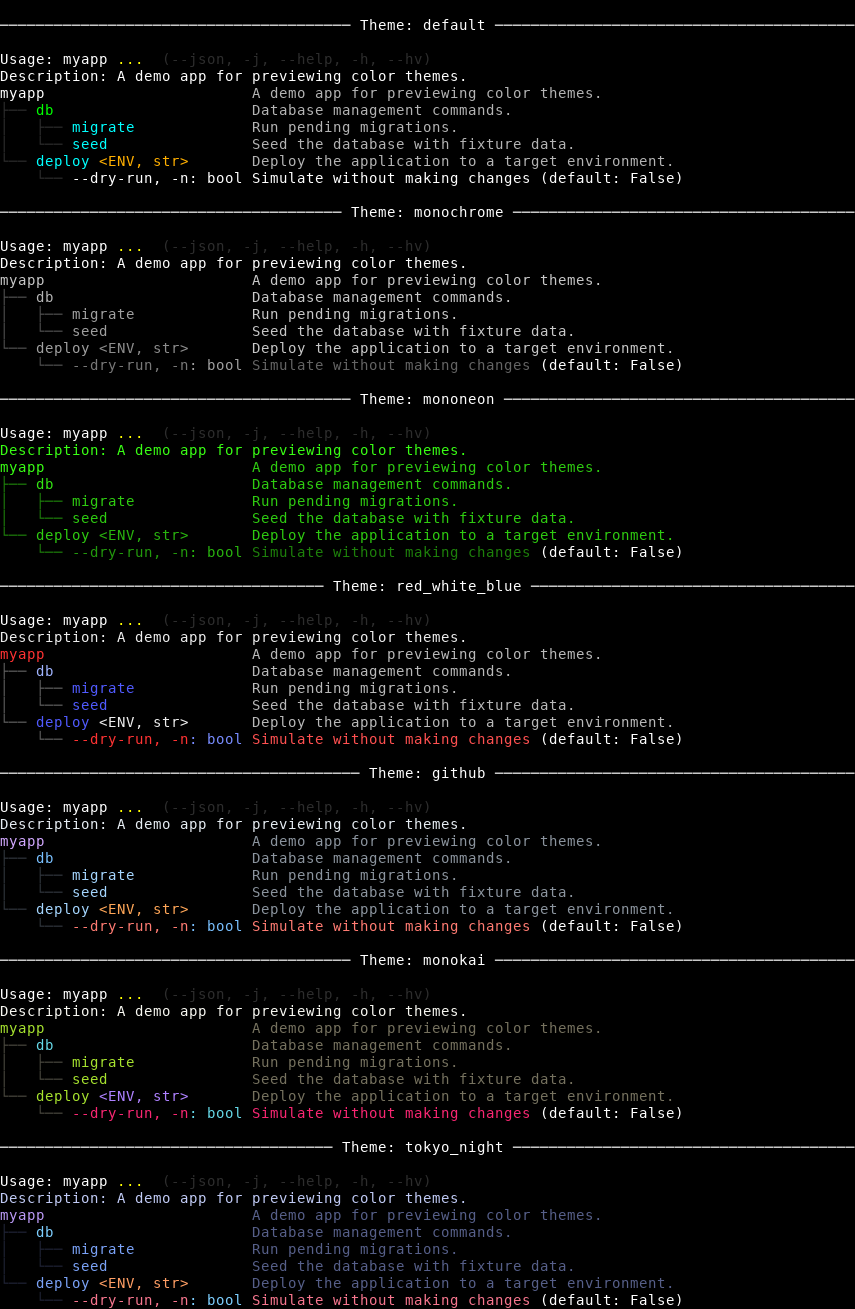
See examples/all_themes_demo.py, examples/theme_demo.py, examples/github_theme_demo.py, and examples/monokai_theme_demo.py for the source.
To regenerate (use env to ensure colors are emitted under the capture):
shellplot png 'env NO_COLOR= FORCE_COLOR=1 CLICOLOR= CLICOLOR_FORCE= TERM=xterm-256color COLORTERM=truecolor uv run --with-editable . python examples/all_themes_demo.py' \
  --output docs/public/all_themes.png --font-size 14 --width 95